01
Upload your best "After" work
Use completed cases that represent how your clinic actually designs smiles, not a generic stock look.
Built for dental & cosmetic clinics
Let patients see realistic implant & veneer previews on your website. Capture every lead automatically — then guide them from curiosity to the chair.
Patient experience
The flow below is the same one prospects run through before they book — so nothing here is staged differently from production.
Upload a smile photo
Patients start from your site or embed — no app install.
See a realistic preview
Implant and veneer looks in seconds, tuned to your options.
Leads land in your dashboard
Contact details sync automatically for your team to follow up.
Cinematic Photo & Video
AI-generated transformations that build instant trust
Seamless CRM Sync
Automates your clinic’s workflow with zero manual effort
High-Intent Patients
Turn your stunning portfolio into premium bookings
Clinic dashboard
See how your team reviews and organizes inbound leads, configures treatment options for patients, and keeps contacts flowing to your CRM — without duplicate entry or switching systems.
A patient visits your page, uploads a smile photo, and instantly sees what veneers or implants could look like — all while you capture their contact details.
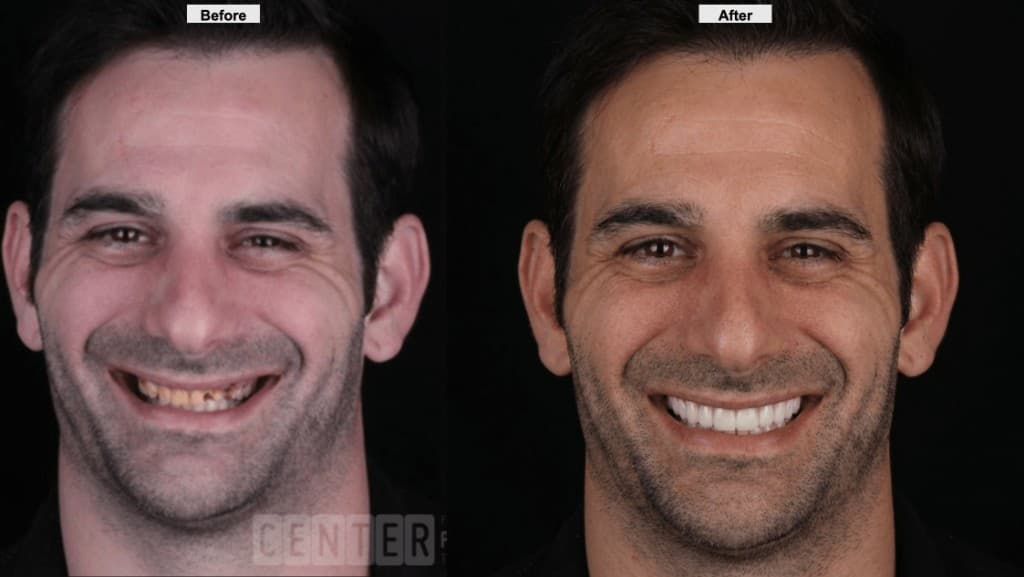
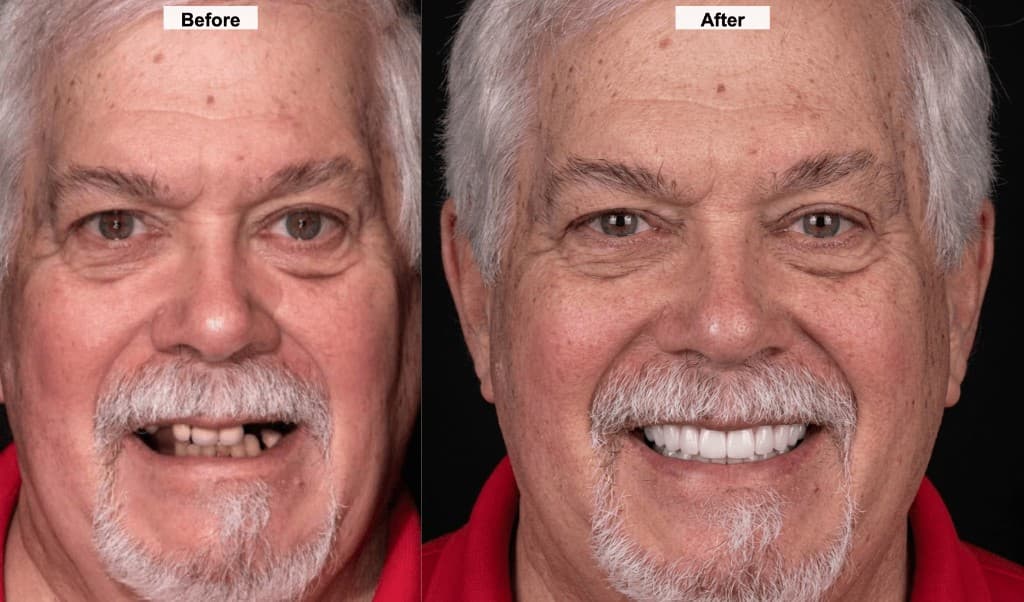
From your branded page or embedded widget — works on any device, no app required.
Choose from the treatment options you configured — veneers, implants, whitening, and more.
Name, phone, and email land in your dashboard and optionally push to your CRM via webhook.
Doctor-trained simulations
BeforeAfterDoc does not show patients a one-size-fits-all smile. Your clinic uploads its own “After” image, the system learns the doctor's aesthetic, and each new lead receives a simulation shaped by the work you actually perform.
01
Use completed cases that represent how your clinic actually designs smiles, not a generic stock look.
02
Shape, shade, tooth proportion, symmetry, and finish become the reference for future previews.
03
Patient simulations are generated toward the clinical style you want to sell and deliver.
Doctor “After”
The outcome you want more patients to request.
Style memory
The clinic's visual standard becomes reusable.
Trusted preview
Leads see a smile aligned with your work.
Specialized for implant and veneer consults — where a visual “why now” drives booking — not generic photo filters.
Patients share name and contact before they run a preview. View and export leads in your clinic dashboard, or send them to your CRM with a webhook.
Drop a single iframe on your marketing site. The flow matches your branding while staying fast and familiar for visitors.
Runs on your clinic’s dedicated page and embed URL. You control which treatment options patients can try.
Push every lead to your existing patient management system in real time. Configure a single webhook URL and you’re connected.
From first sign-in to first patient preview, the path is built for busy clinic teams.
Sign up or sign in with your work email and password on the shared login page, then open your clinic dashboard.
Start free or pick the subscription that fits your consult volume. Upgrade anytime from the dashboard.
Define the implant and veneer (and other) looks patients can try, aligned with how you actually treat.
Send patients to your public page or paste the iframe into your site — the same flow, your domain.
Choose a floating widget visitors launch from your pages, or a full-page embed for dedicated treatment content. Both capture leads in your dashboard and work on any device.
BeforeAfterDoc embed
Patients upload a photo, pick treatment options, and see a before/after preview — without leaving your website.
A launcher on your site opens the full simulator in an overlay, so patients stay on your page while they try treatments and share their details.
Place the experience inline on a dedicated page—ideal for high-intent service or campaign URLs—with the same lead capture and branding you use everywhere.
Works with WordPress, Wix, Squarespace, Webflow, and custom sites. Your team pastes a short script or iframe once; we host the experience securely.
Pricing
Every tier includes photo and video simulations, lead capture, and branded delivery—patient results go to WhatsApp with your clinic name. Paid plans add a time-limited trial with its own usage cap before billing begins.
For clinics getting started with patient simulations and lead capture.
3-day trial · up to 9 Before Afters during trial
Before Afters & options
Simulations
Delivery & branding
Platform
Growing practices that want more lead volume and CRM connectivity.
3-day trial · up to 9 Before Afters during trial
Before Afters & options
Simulations
Delivery & branding
Platform
High-volume clinics that need priority delivery, scale, and hands-on support.
3-day trial · up to 9 Before Afters during trial
Before Afters & options
Simulations
Delivery & branding
Platform
Before Afters count each time a visitor completes your capture flow and receives a simulation. Trial usage caps apply until the trial ends or the limit is reached—whichever comes first. A payment method is required to activate a paid-plan trial; you can still create an account first.
Hear from clinics that are already converting more consult requests with BeforeAfterDoc.
“We embedded BeforeAfterDoc on our implant page and saw consult requests jump 40% in the first month. Patients come in already excited about the outcome.”
Dr. Sarah Mitchell
Prosthodontist · Bright Smile Dental
“The lead capture alone paid for itself. Every patient who runs a preview gives us their info — our front desk follows up the same day.”
Dr. James Chen
Practice Owner · Pacific Coast Dentistry
“Setup took five minutes. I pasted the embed code on our website, configured the veneer options, and we were live before lunch. The AI previews look surprisingly realistic.”
Dr. Maria Lopez
Cosmetic Dentist · Lakeview Dental Studio
Quick answers for practice owners and marketing leads.
No. Patients use your public page or embedded flow with their contact details so you can follow up — your team stays in control of next steps.
Yes. Paid plans include a trial so you can test the full experience with real patients. You add a payment method when you activate the trial; you are only charged according to the plan terms after the trial if you continue.
You configure the options in your dashboard — veneers, implants, whitening, and any other treatments you offer. Patients only see what you enable.
They appear in your clinic dashboard for review and CSV export. You can also configure a webhook URL in settings to push each submission to your CRM or automation tool.
Add your CRM’s webhook URL in the clinic settings. Every time a patient submits their details, the data is sent to your CRM in real time — compatible with Zapier, HubSpot, Salesforce, and more.
Clinic staff sign in at the shared login page with email and password. After that you land in the dashboard; if you have not picked a plan yet, you will be guided to subscription first.
Absolutely. Photos are processed securely via our AI pipeline, and all data is stored with encryption at rest. We follow HIPAA-conscious practices and never share patient data with third parties.
Yes. The snippet uses a common default height; adjust the height attribute to fit your layout. Width="100%" lets it span your content column.